Protocol Review Committee Members & Procedures
All pharmaceutical, cooperative group, and investigator-initiated protocols involving cancer patients or cancer-relevant studies must receive a review by the PRC. Examples include: studies about cancer risk factors, prevention, cancer treatment, survivorship or studies that include participants currently or previously diagnosed with cancer or their caregivers.
- The PRC meets on the second Thursday and fourth Monday of every month. The deadline for submission is 12:00 pm. two weeks prior to the meeting
- PRC submissions should be completed via the OnCore ePRMS Submission Console. Please reach out to OnCore Support (ONCORESUPPORT@uvahealth.org) for system access or help with protocol submission to the PRC. We also recommend viewing the PRC Submission Digital Training Module.
- Cancer Prevention & Population Health (CPH) investigators may complete the PRC Submission form in REDCap. Once the form is completed, the PRC Coordinator will reach out with next steps.
- For each new interventional (therapeutic or non-therapeutic) or non-interventional protocol submission to the PRC, the PI/Study team is required to submit the following documents:
- Study Protocol
- PRC Submission Form
- Investigator Drug Brochure/ Investigator Device Brochure (if applicable)
- The PRC Chair with the assistance of the PRC coordinator determines if a protocol requires full board review, or if it’s eligible for administrative/expedited review, or if it’s exempt from PRC review.
- The PRC assigns risk classification level for all new protocols. This also dictates the level of CC DSMC monitoring for UVA IITs.
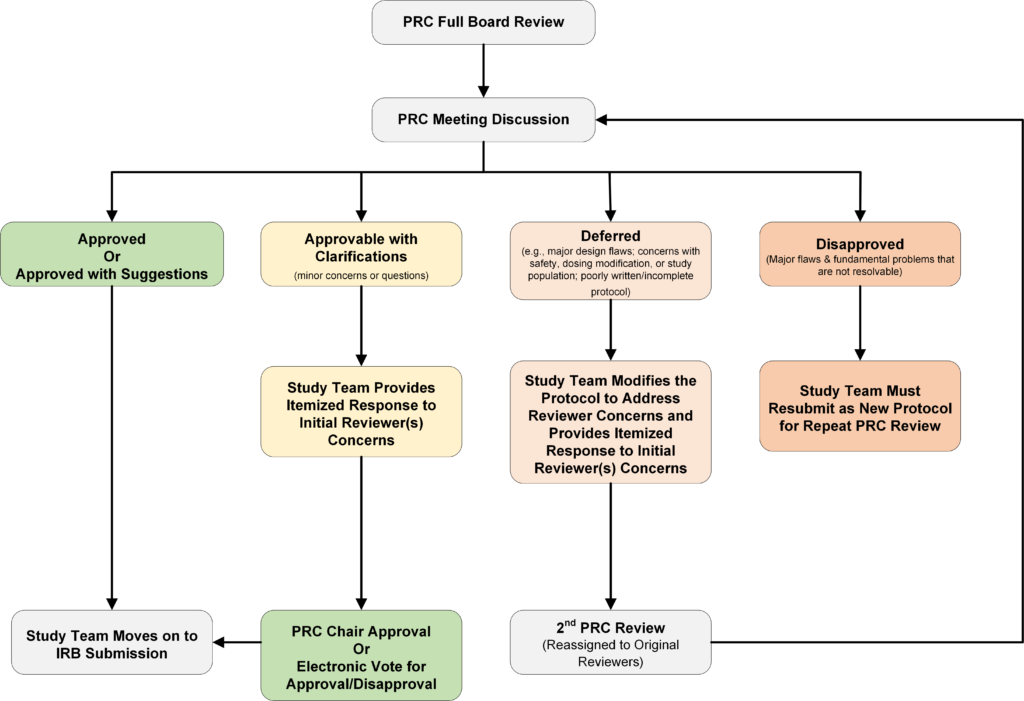
- After the meeting, PRC decision letters are uploaded in the OnCore ePRMS Console and an auto-generated notification email with the letter is sent to the investigator.
- When revisions and/or responses are required, the study investigator is expected to respond within 30 days. The protocol will be considered under PRC review process until it is approved, withdrawn by the study team, or if more than 6 months have elapsed between the initial PRC review and the study team’s response.
- Submission to the Institutional Review Board for Health Sciences Research will require a final approval letter from the PRC Chair/Co-chair.
- Once a protocol has undergone an initial PRC review and approval, all subsequent protocol revisions/modifications require PRC review and approval (except NCI Cooperative group and exempt protocols).
- If you are unsure your protocol amendment is exempt from PRC review, please email the PRC Coordinator your protocol amendment with the summary of changes. We will review the document(s) and provide a response.
- PRC amendment submissions should be completed via the OnCore ePRMS Submission Console. Please reach out to OnCore Support (ONCORESUPPORT@uvahealth.org) for system access or help with amendment submission to the PRC. We also recommend viewing the PRC Submission Digital Training Module.
- When submitting revisions to a protocol, please ensure that a tracked change version and a summary of changes are included in the submission.
- Post PRC approval, the following types of protocol amendments and document updates are exempt from PRC review:
- Personnel updates/changes
- Simple clarifications to protocol language or administrative changes
- AE reporting clarifications
- Important safety concerns (proceed to IRB)
- Modifications/amendments for cooperative group and other externally peer-reviewed protocols that have already received PRC approval
- Recruitment materials updates/changes
- Consent form updates/changes
- Investigator’s brochure updates/changes
- The PRC monitors accrual to all cancer-related clinical trials that enroll human subjects or that use clinical specimens that can be linked to individual patient or participant data. Accruals are reviewed at PRC semi-annual performance review meetings in May and November. PRC may close non-accruing trials and a letter with this recommendation is sent to the PI.
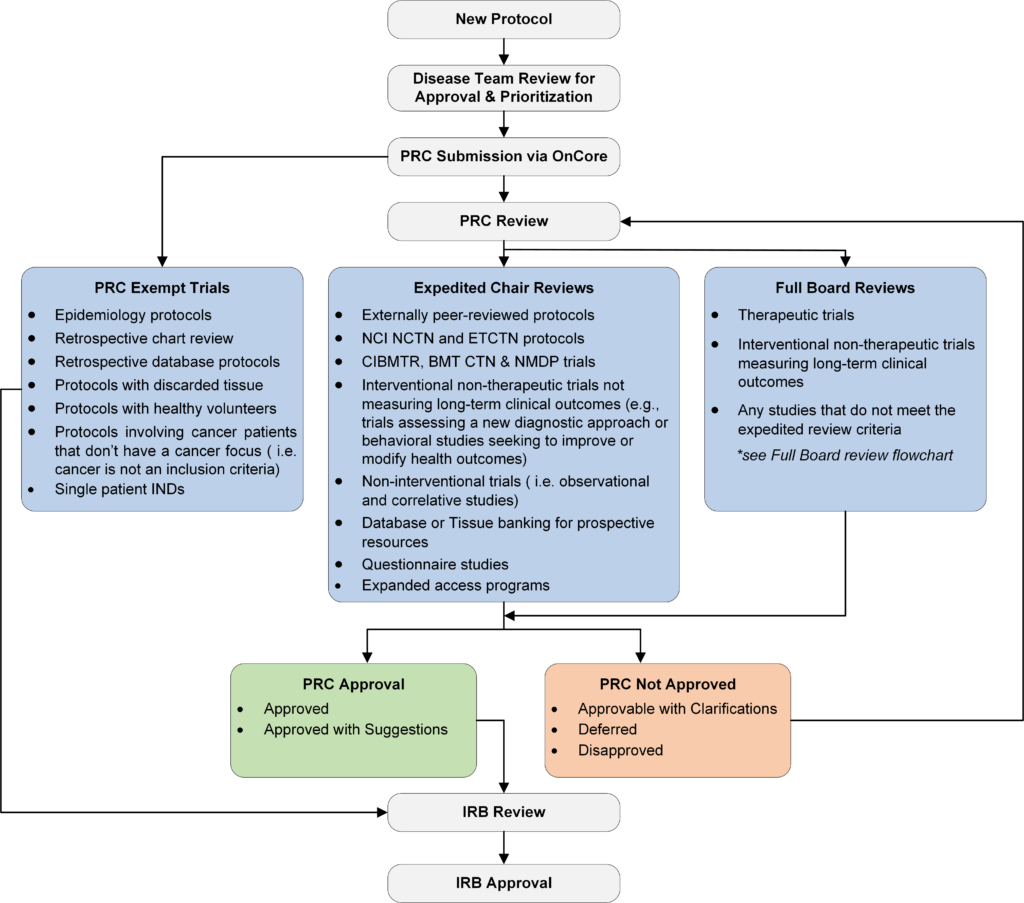
- Please note: PRC will provide a letter of exemption for any new protocols that do not require PRC review. Email the PRC coordinator if you believe your study should be exempt from PRC review.
![OnCore TipSheet: Answering PRC Query: This tip sheet provides step-by-step instructions for responding to a PRC query that requires a reply in order for the review process to move forward. Within the ePRMS Submission Console, the “Active” tab displays submissions that are currently under review or awaiting a response. This Active tab also contains the “Response Required” table, which lists submissions with outstanding questions that must be addressed before the review process can proceed. Queries From the PRC Coordinator: Navigate to Menu > ePRMS > Submission Console [screen grab of pull-down menu) . All active PRC reviews for which you are listed as the submitter will be displayed in your view. The PRC Coordinator checks the submission for completeness and will send a query if the submission is incomplete. The submitter can respond to query by: 1. Clicking the Submission No. and scrolling to the bottom and clicking the “Query Detail” button. Or, by clicking the “Detail” link for the submission in the Query Detail column of the “Response Required” section. The Query Detail page is displayed. [screen grab of ePRMS submission console] 2. The Query Detail page will show the query that requires a response. Examples of common queries from the PRC Coordinator include: • Upload of any missing documents • A summary of changes document, if missing for an amendment • A tracked version of the protocol amendment • Completion of the PRC submission form, if incomplete • Corrections to study details in OnCore, if any information is inaccurate • Upload of open protocol documents if the submitted files are password-protected. Click “Edit” to enter a response. (Note: Any documents provided in response to the query must be uploaded in the Documents section of the Submission.) [screen grab of ePRMS submission console] 3.To make changes or updates to the submission, click the “Back to Submission button”, then the “Update” button at the bottom of the Submission page to make edits as needed. [screen grab of “Documents” and “Review History” windows highlighting the “Update” button at bottom right] 4. Upload any missing documents (e.g., protocol, PRC Submission Form, IB etc.) in the Documents section of the submission. (NOTE: All documents must be uploaded in the Documents section of the submission. Only upload the documents specifically requested in the query. If you are uploading a revised PRC Submission Form, remember to delete any older version from the submission) Click “Save” once all edits and uploads are complete. [screen grab of “Documents” and “Review History” windows highlighting the “Add ” button at upper right and the “Save” button, third from bottom right] 5.Once the issues have been addressed, return to the Query Detail page by clicking the “Query Detail” button. 6. In the Query Details page, click the “Edit” link next to the Query. [screen grab of the “Query Detail” window highlighting the “Response” text input field and the “Submit” button second from bottom right] • The Response box is displayed at the top of the page. Type a message (up to 1000 characters) detailing how the Query was addressed. Then, click the “Submit” button to save the response. Note: a response must be entered, otherwise the system will not allow the submission to move forward. The following are some example responses: • Requested documents uploaded • Requested changes have been made 7. When all the Queries have been addressed, click the Respond button to return the submission to the PRC Coordinator. This will move the submission to the Pending tab. [screen grab with arrow pointing to the “Respond” button second from lower right; screen grab of the updated ePRMS Submission Console menu with “Pending” active.] Queries From the Committee: Navigate to menu > EPRMS > Submission console [screen grab of pull-down menu). After reviewing a protocol, the PRC decisions of “Approvable with Clarifications” or “Deferred” will require a response from the PI/Study team. 1. The submitter will navigate to the ePRMS Submission Console in OnCore. The protocol will be in the “Active” tab, in the “Response Required” section/table. [Screen grab of the ePRMS Submission Console table with a submission number and corresponding “Response Required” cell highlighted] 2. Create a response letter/memo that addresses each question/concern from the PRC. 3. The PI/Study team response letter/memo is uploaded in the Query Details page. Note, only one document can be uploaded in the Query Details page. [Screen grab of ePRMS Submission Console] 4. Any revised protocol or supporting documents should be uploaded in the Documents section of the submission (as outlined above in Steps 3–4 under answering “Queries from the PRC Coordinator”) [screen grab of the “Query Detail” window highlighting the “Response” text input field and the “Submit” button second from bottom right]. 5. Once all documents have been uploaded, click “Save to apply the changes, and return to the Query Detail page by clicking the “Query Detail” button. Click the “Edit” link next to the Query and type a brief message stating that the response letter and any revised protocol documents have been uploaded. Then, click the “Submit” button to save the response (as shown above in step 6 for answering “Queries from PRC Coordinator”). Note, a response must be entered, otherwise the system will not allow the submission to move forward. 6. When all the documents have been uploaded, click the “Respond” button to return the submission to the PRC Coordinator. This will move the submission to the “Pending” tab. For OnCore access or questions about using the ePRMS Console, please contact oncoresupport@uvahealth.org. For questions about the PRC review process, please contact the PRC Coordinator at sm4pp@uvahealth.org.](https://med.virginia.edu/cancer-research/wp-content/uploads/sites/438/2025/09/OnCore-Tip-Sheet_Answering-PRC-Queries-1.jpg)


If you have questions, please contact Saba Mahmood at sm4pp@uvahealth.org.
PRC Members
Ryan Gentzler, MD
Hematology Oncology
PRC Chair, Department of Medicine
Emily Ayers, MD
Hematology Oncology
PRC Co-chair, Department of Medicine
Roger Abounader, MD
Microbiology, Immunology & Cancer Biology and Neurology
Michael Devitt, MD
Hematology Oncology
Patrick Dillon, MD
Hematology Oncology
Michael Keng, MD
Hematology Oncology
Christopher McLaughlin, MD
Radiation Oncology
Daniel Reed, MD
Hematology Oncology
Kari Ring, MD
Gynecologic Oncology
Kara Romano, MD
Radiation Oncology
Krithika Shanmugasundaram, MD
Hematology Oncology
David Shonka, MD
Otolaryngology
Shayna Showalter, MD
Surgical Oncology
William Skelton, MD
Hematology Oncology
Paul Vincent Viscuse, MD
Hematology Oncology
Matthew Wagar, MD
Gynecologic Oncology
Phil Chow, PhD
Center for Behavioral Health & Technology
Soutik Ghosal, PhD
Department of Public Health Sciences, Division of Biostatistics
Debamita Kundu, PhD
Department of Public Health Sciences, Division of Biostatistics
Hong Zhu, PhD
Department of Public Health Sciences, Division of Biostatistics
Michal Ande, CCRC
Clinical Research Coordinator 3
Alexandra Cash, BS, CCRP
Clinical Research Coordinator 2
Christopher Clemens
Clinical Research Coordinator 2
Ashley Donihee
Clinical Research Coordinator 2
Cara Hanby, BS, CCRP
Protocol Development Specialist
Jason Fulbrook
Pharmacist
Alia Lynch
Pharmacist
Emily Fitch
Pharmacist
Shalini Kochicheril
Pharmacist
Lindsey Chippendale
Pharmacist
Lauren Yates
Pharmacist
Kelsey Marques
Pharmacist
Saba Mahmood
Senior Compliance Analyst